GitHub Integration for Quome Projects

Information about connecting Quome projects with GitHub for version control and collaboration.
Connect Quome development workflows to GitHub for enterprise-grade version control, team collaboration, and deployment flexibility while maintaining security and compliance standards for regulated industries.
Why connect GitHub?
- Version control - Track every change to your application code
- Team collaboration - Work together using standard Git workflows
- Code portability - Your code isn't locked into Quome's platform
- CI/CD integration - Deploy from GitHub using your own pipelines
- Audit trails - Complete history for compliance and debugging
How it works
Understanding GitHub's Role in Quome
GitHub serves as the backbone for professional software development, providing Git-based version control that tracks every change to your codebase.
When you connect GitHub integration:
- Initial sync - Quome pushes your current app code to the repository
- Automatic commits - Every app change creates a commit with a clear message
- Branch management - Changes go to a development branch by default
- Pull requests - Quome can create PRs for review workflows
- Deployment hooks - Deploy from GitHub using webhooks or Actions
Quick setup
- Go to project settings - Click the settings icon for your app
- Connect GitHub - Click "Connect GitHub" and authorize the Quome app
- Choose repository - Create a new repo or connect to an existing one
- Sync automatically - All future changes sync to GitHub automatically
| Capability | Benefit for Quome Users |
|---|---|
| Automated Backups | Every change in your Quome App Builder creates commits that are immediately saved to GitHub, providing redundant storage for your application code |
| Collaborative Development | Technical and business stakeholders can review, comment, and contribute to your project using pull requests and issues |
| Continuous Integration | Leverage GitHub Actions to automate security scans, compliance checks, and deployments as your application evolves |
| Multi-Environment Deployment | Deploy your Quome application to any infrastructure while maintaining the connection to Quome's development environment |
| Regulatory Compliance | Create the detailed audit trails and change documentation required for HIPAA, SOC 2, and other regulatory frameworks |
The integration operates unidirectionally: modifications made through Quome's AI-powered interface automatically appear in GitHub, providing continuous backup and enabling external collaboration through GitHub's platform.
Enterprise Security Considerations
GitHub integration enhances Quome's security-first architecture by providing:
- Immutable Change Records: Every modification is cryptographically signed and timestamped
- Access Control: Leverage GitHub's enterprise authentication and authorization systems
- Branch Protection: Implement code review requirements and automated quality gates
- Third-party Integrations: Connect to enterprise security scanning and compliance tools
Setting Up GitHub Integration
The GitHub connection process involves three main phases: authentication, repository creation, and sync verification. Each phase includes specific security controls to ensure your enterprise data remains protected.
Video Tutorial: GitHub Repository Setup
Watch this step-by-step guide to connecting your Quome project with GitHub:
Tutorial demonstrates the complete GitHub integration workflow from initial setup through repository synchronization.
Setting up the connection
Step 1: Authorize the GitHub app
Click "Connect GitHub" in your project settings. You'll be redirected to GitHub to:
- Install the Quome GitHub app (first time only)
- Choose which repositories Quome can access
- Grant necessary permissions
Step 2: Repository setup
Choose how to handle your repository:
| Option | Best for | Result |
|---|---|---|
| Create new repository | New projects | Quome creates a private repo with your code |
| Use existing repository | Existing projects | Quome pushes to a branch in your repo |
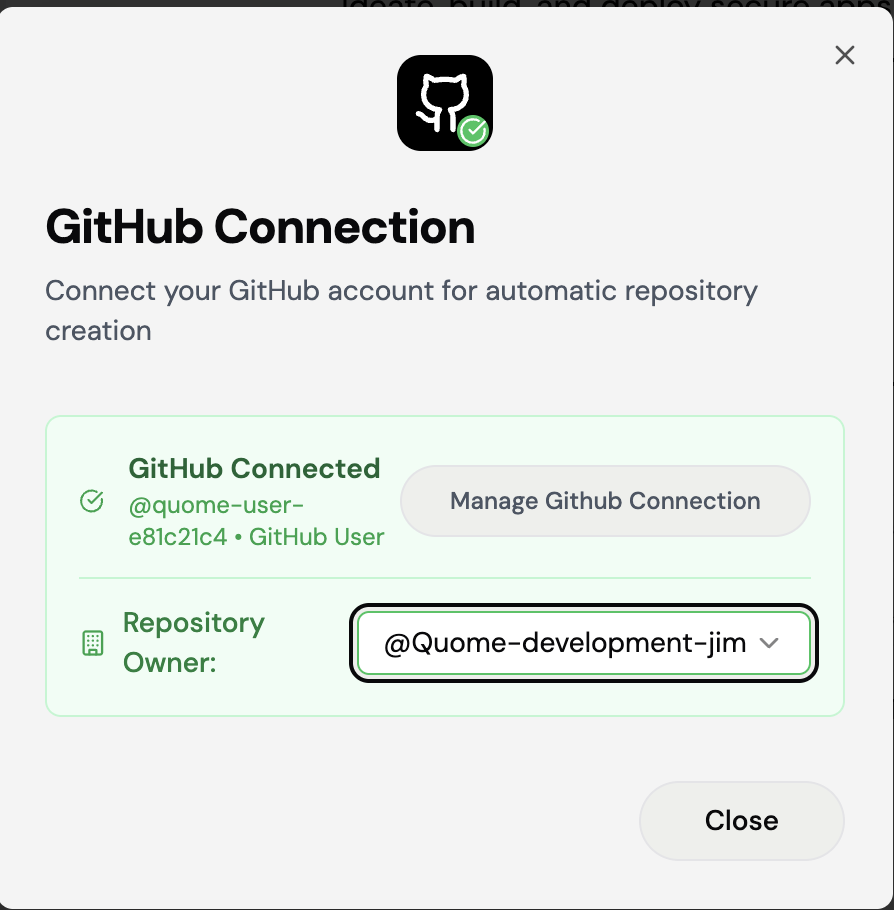
Quome can deploy to any GitHub organization where you have appropriate permissions. During the authorization process, you can grant access to multiple organizations, enabling flexible enterprise collaboration across different organizational boundaries.
Phase 2: Repository Initialization
Once authentication completes, Quome automatically provisions a new GitHub repository containing:
your-project-name/
├── backend/               # Python API server with database
├── frontend/              # React application with TypeScript
├── testing/              # Automated testing suite (Playwright)
├── compose.yml           # Docker orchestration configuration
├── dev.Dockerfile        # Development container setup
├── Dockerfile           # Production container build
└── README.md           # Project documentation
Repository Structure Overview
Quome generates production-ready full-stack applications with enterprise-grade architecture:
Backend Infrastructure
- Python API: Flask/FastAPI-based backend with
main.pyas the entry point - Database Integration: SQLite for development (
test.db) with production database connectivity - Container Support: Docker configuration with
Dockerfileanddev.Dockerfilefor different environments - Dependencies: Complete Python requirements management via
requirements.txt
Frontend Architecture
- React/TypeScript: Modern frontend built with Vite for optimal development experience
- Component Library: Comprehensive UI components including Shadcn/UI for consistent design
- Business Logic: Specialized components for trading, compliance, portfolio management, and risk assessment
- Authentication: Built-in auth context and route protection for secure user management
- Responsive Design: Tailwind CSS integration with mobile-first responsive components
Enterprise Features
- Compliance Ready: Dedicated components for KYC, audit trails, regulatory reports, and compliance monitoring
- Security First: Multi-factor authentication, secure routing, and privacy controls built-in
- Financial Services: Trading execution, portfolio management, market data integration, and risk assessment tools
- Audit & Reporting: Comprehensive audit trail functionality and regulatory reporting capabilities
Testing & Quality Assurance
- End-to-End Testing: Playwright test suite covering all major application flows
- Accessibility Testing: WCAG compliance validation for enterprise accessibility requirements
- Performance Testing: Route loading and navigation performance validation
- Security Testing: Authentication, authorization, and data protection test coverage
This structure demonstrates Quome's capability to generate sophisticated, compliant applications that are immediately ready for enterprise deployment while maintaining clean, maintainable code organization.
Phase 3: Sync Verification
Validate Connection Status
After repository creation, verify the integration is active by checking:
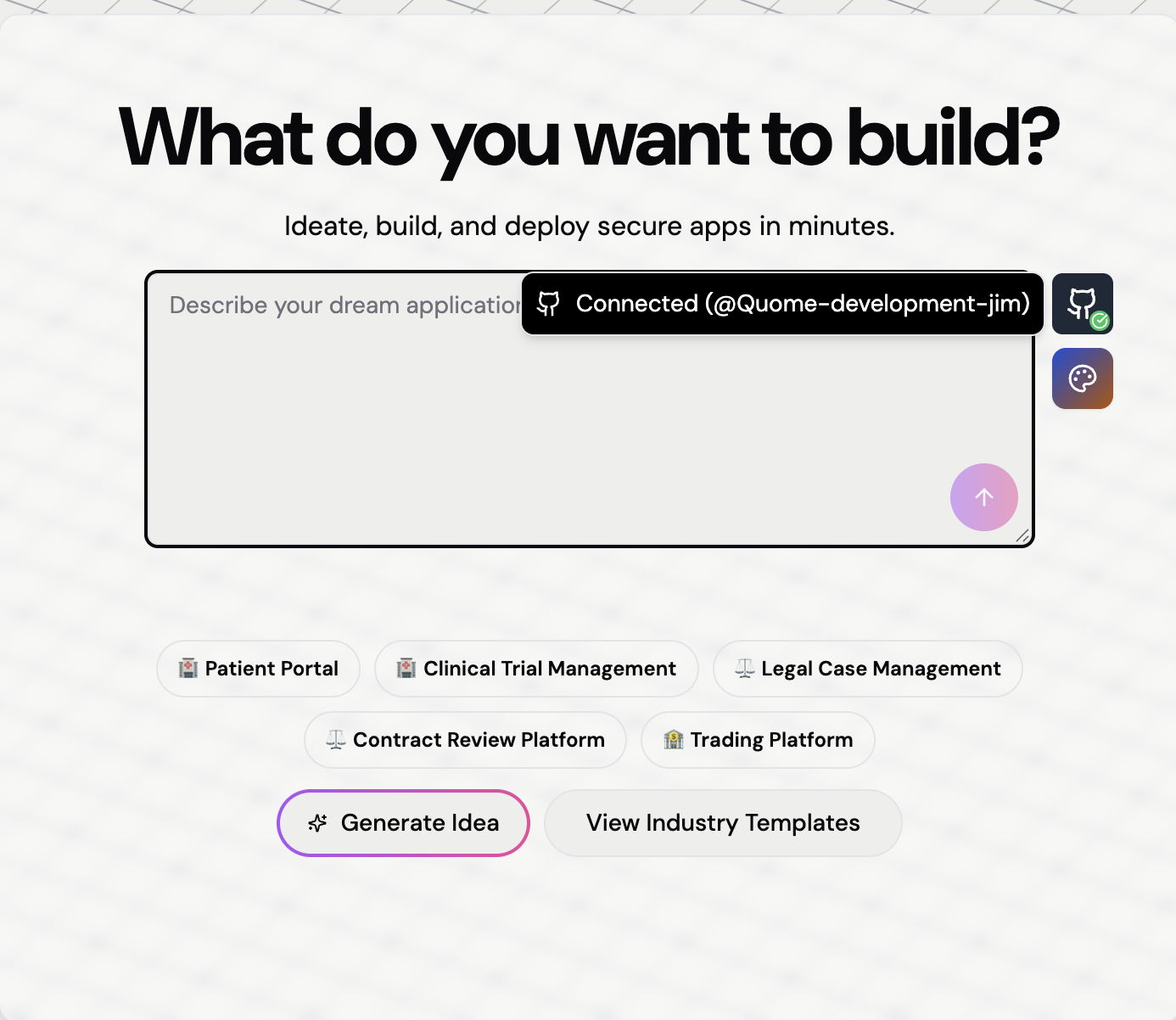
- Quome Dashboard: Confirm the GitHub repository link appears in your project settings
- GitHub Repository: Verify all project files are present and properly organized
- Sync Test: Make a small change in Quome and confirm it appears in GitHub within 30 seconds
Multi-Project Management
Each Quome project creates its own dedicated GitHub repository. This isolation ensures clear separation of concerns and simplifies compliance auditing for regulated applications.
GitHub Synchronization Architecture
Quome's GitHub integration operates through a secure, automated synchronization engine that ensures your development work is continuously backed up and accessible through GitHub's collaboration platform.
Branch Management Strategy
Primary Branch Focus
The integration monitors and synchronizes exclusively with your repository's default branch (commonly main or master). This design choice supports several enterprise requirements:
- Compliance Auditing: Creates a single, authoritative source of truth for regulatory reviews
- Security Oversight: Simplifies access control and security monitoring
- Deployment Consistency: Ensures production deployments always reflect the same codebase seen in Quome
Multi-Branch Considerations
Development work on feature branches remains isolated from Quome until merged to the default branch. This pattern supports:
- Code review processes required by enterprise security policies
- Feature flag management and gradual rollouts
- Quality assurance workflows that validate changes before production
Synchronization Architecture
Current Implementation: Quome → GitHub
Quome currently supports unidirectional synchronization, automatically pushing changes from your Quome project to the connected GitHub repository. This ensures your code is continuously backed up and available for external collaboration.
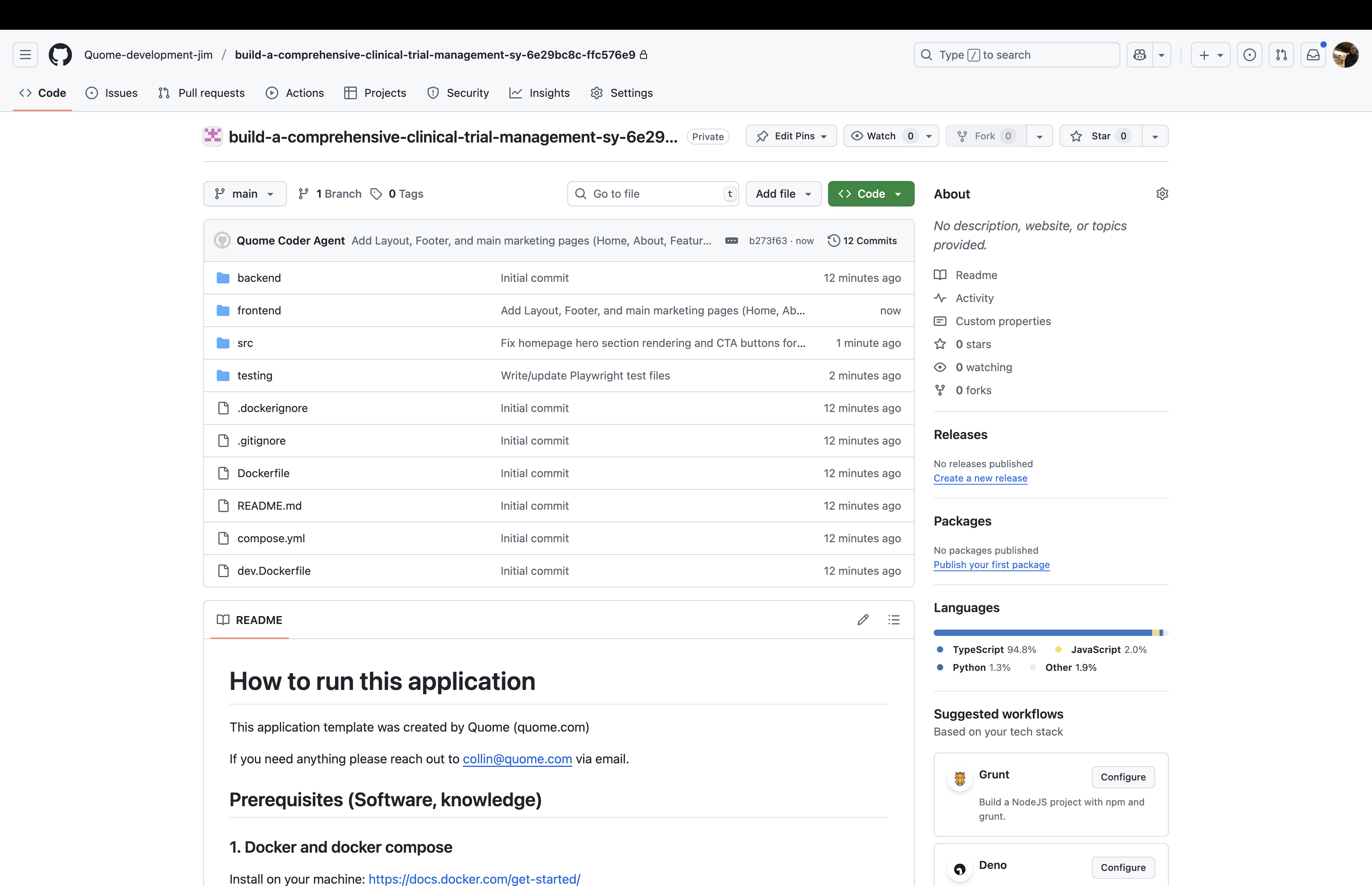
Structured Commit Generation
Every change made through the Quome interface creates structured commits that include:
- Descriptive Messages: Auto-generated commit messages that document the specific changes made
- Metadata Tags: Additional context about the change source (AI-generated, manual edit, etc.)
- Compliance Artifacts: Updated SBOM files and security configuration changes
- Timestamp Records: Precise change timing for audit trail purposes
Future Enhancement: Bidirectional Sync
GitHub → Quome synchronization is planned for future releases, which will enable:
- Real-time updates when developers push changes directly to GitHub
- Seamless collaboration between Quome's AI-assisted development and traditional Git workflows
- Automatic conflict detection and resolution protocols
Repository Management
With unidirectional synchronization, repository management focuses on maintaining clean, traceable development history:
Commit Organization: Quome automatically organizes commits with clear attribution and comprehensive metadata, making it easy to track project evolution and regulatory compliance.
Branch Protection: Since changes flow from Quome to GitHub, you can implement GitHub branch protection rules to:
- Require manual reviews before changes reach production branches
- Run automated security scans and compliance checks
- Integrate with CI/CD pipelines for deployment automation
External Collaboration: Team members can review, comment, and create issues on GitHub while development continues in Quome, enabling hybrid workflows that combine AI-assisted development with traditional code review processes.
Working with Existing Codebases
While Quome's GitHub integration excels at managing new projects, incorporating existing codebases requires specific migration strategies. Here are the current approaches available:
Migration Workflows
Approach 1: Repository Transfer Method
This method works best for complete codebase migrations:
- Initialize New Quome Project: Create a fresh project and establish GitHub connectivity
- Local Repository Setup: Clone the newly created (empty) GitHub repository locally
- Code Migration: Copy your existing source code into the cloned repository
- Push and Sync: Commit and push changes; Quome automatically detects and imports the codebase
Approach 2: Incremental Component Migration
For selective migration or when integrating specific features:
- Use Quome's App Builder to create the basic application structure
- Copy individual components, modules, or functions through the interface
- Leverage AI assistance to adapt existing code to Quome's architecture patterns
- Maintain the original repository separately for reference
Migration Considerations
Configuration Dependencies
Existing projects often require specific setup for:
- Environment variable configurations
- Database connection strings
- Third-party service integrations
- Security policy definitions
Quome's enterprise platform provides secure configuration management that can replicate these requirements.
Future Capabilities
Direct repository import functionality is under development. Check the official documentation for updates on this feature's availability.
Hybrid Development Workflows
The GitHub integration enables sophisticated development patterns that combine Quome's AI-powered capabilities with traditional software engineering practices. Teams can adopt flexible approaches that match their specific expertise and project requirements.
Development Environment Options
Integrated Repository Access
Direct repository navigation is available within the Quome interface through dedicated GitHub links. This provides immediate access to:
- Source code browsing and file-level editing
- Commit history and change attribution
- Issue tracking and project management features
- Branch management and merge request workflows
External Development Tools
Teams can leverage their preferred development environments while maintaining Quome synchronization:
| Tool Type | Examples | Use Cases |
|---|---|---|
| Local IDEs | VS Code, IntelliJ, WebStorm | Complex refactoring, advanced debugging, custom tooling |
| Cloud IDEs | GitHub Codespaces, GitPod | Consistent development environments, onboarding new team members |
| Command Line | Git CLI, GitHub CLI | Automation scripts, bulk operations, advanced Git workflows |
Collaboration Patterns
Multi-Role Team Integration
Different team members can contribute using their preferred tools:
Business Analyst → Quome App Builder → Requirements to Features
    ↓
Developer → Local IDE → Code Review & Optimization
    ↓
DevOps Engineer → GitHub Actions → Deployment & Monitoring
Quality Assurance Workflows
The integration supports enterprise-grade quality processes:
- Feature Branch Development: Isolate changes until ready for production
- Automated Testing: GitHub Actions can run security scans and compliance checks
- Code Review Requirements: Enforce peer review before merging to main
- Staged Deployments: Deploy to development/staging environments before production
Automation Capabilities
Continuous Integration Examples
Sample GitHub Actions workflows for Quome projects:
- Security Scanning: Automatic vulnerability detection on pull requests
- Compliance Validation: HIPAA and SOC 2 requirement checking
- Performance Testing: Automated load testing for critical user journeys
- Documentation Generation: Auto-update API documentation and compliance artifacts
Custom Workflow Integration
Teams can build sophisticated automation by combining Quome's APIs with GitHub Actions:
- Trigger Quome deployments from GitHub releases
- Generate compliance reports automatically
- Notify teams about security or performance issues
- Integrate with enterprise monitoring and alerting systems
Version Control and Recovery Strategies
Effective change management is critical for regulated applications. The GitHub integration provides multiple layers of protection and documentation to support enterprise compliance requirements.
Commit Message Standards
Professional commit messaging supports both technical collaboration and regulatory auditing:
Effective Commit Messages
✓ "Implement patient consent validation per HIPAA requirements"
✓ "Add encryption for PHI data transmission endpoints"
✓ "Update authentication flow to support MFA requirements"

✗ "fix bug"
✗ "update"
✗ "changes"
Automated Commit Generation
Quome automatically generates structured commit messages for AI-assisted changes, including:
- Specific feature or component modified
- Type of change (creation, modification, deletion)
- Compliance or security implications
- Reference to original user prompt or requirement
Multi-Level Recovery Options
Application-Level Recovery
Quome's built-in version history provides immediate rollback capabilities:
- Visual Timeline: See all changes with timestamps and descriptions
- One-Click Restore: Revert to any previous application state
- Selective Recovery: Restore specific components without affecting the entire application
- Preview Mode: Review previous versions before committing to rollback
Repository-Level Recovery
GitHub provides additional recovery mechanisms:
- Commit Reversion: Create inverse commits that undo specific changes
- Branch Restoration: Recover deleted branches or reset branch states
- Release Management: Tag stable versions for easy restoration points
- Backup Integration: Leverage GitHub's infrastructure for distributed backup
Change Management Workflows
Staged Development Process
Feature Branch → Code Review → Testing → Main Branch → Production
      ↓              ↓           ↓            ↓            ↓
    Isolated     Peer Review  Quality    Quome Sync   Live App
   Development   & Approval   Assurance   & Deploy    Updates
Compliance Documentation
The integration automatically maintains audit trails including:
- Change Attribution: Who made each modification and when
- Approval Chains: Evidence of required reviews and approvals
- Security Impact: Analysis of changes affecting sensitive data or security controls
- Regulatory Mapping: Documentation of how changes relate to compliance requirements
For comprehensive compliance support, review Quome's security framework and platform documentation.
Integration Support and Common Issues
This section addresses frequent challenges and provides diagnostic guidance for GitHub integration issues. Solutions are organized by symptom category for efficient troubleshooting.
Synchronization Problems
Issue: External Code Changes Not Reflected in Quome
| Symptom | Diagnosis | Resolution |
|---|---|---|
| GitHub commits not showing in Quome | Feature not yet available | GitHub → Quome sync is planned for future releases; currently only supports Quome → GitHub |
| Manual GitHub edits invisible in Quome | Unidirectional sync limitation | Continue development in Quome; GitHub serves as backup and collaboration platform |
| Branch changes not synchronized | Current architecture design | Quome pushes to default branch only; use GitHub for external collaboration and review |
Issue: Changes Not Appearing in GitHub
| Symptom | Diagnosis | Resolution |
|---|---|---|
| Quome changes not pushed | Authentication timeout | Refresh GitHub integration connection in Quome settings |
| Missing commit messages | API rate limiting | Wait for rate limit reset; consider reducing change frequency |
| Incomplete repository state | Large file handling | Review repository size limits; optimize large assets |
Configuration Management
Default Branch Modification
When changing the branch that Quome monitors for synchronization:
-
GitHub Repository Settings
- Navigate to Settings → Branches → Default branch
- Select desired branch from dropdown
- Confirm change and save settings
-
Content Migration
# Ensure new default branch contains required content
git checkout new-default-branch
git merge old-default-branch
git push origin new-default-branch -
Validation Steps
- Verify Quome reflects the new branch content
- Test bidirectional synchronization with a small change
- Monitor webhook delivery for successful integration
Deployment and Hosting Options
Self-Hosted Deployment Strategies
Quome applications can be deployed independently while maintaining GitHub integration:
Cloud Platform Deployment
- AWS: Use Elastic Beanstalk or container services (ECS/EKS)
- Azure: Deploy to App Services or Container Instances
- Google Cloud: Utilize Cloud Run or Google Kubernetes Engine
Enterprise Infrastructure
- Container orchestration with Docker/Kubernetes
- Traditional server deployment with process managers
- Integration with existing CI/CD pipelines
Hybrid Development Model
Quome (Development) ←→ GitHub (Source Control) ←→ Production (Self-hosted)
       ↑                        ↓                         ↓
   AI-Assisted            Version Control           Enterprise
   Development            & Collaboration           Infrastructure
Infrastructure Considerations
When self-hosting, ensure you replicate key Quome platform capabilities:
- Secure secrets management (similar to Quome's enterprise-grade system)
- Container security (equivalent to Quome's gVisor sandboxing)
- Compliance monitoring (matching Quome's SBOM generation and audit trails)
- Performance optimization (matching Quome's platform optimizations)
For enterprise deployment planning, consult Quome's professional services team for architecture guidance and implementation support.
Summary
GitHub integration extends Quome beyond a standalone AI development platform to provide a comprehensive enterprise development ecosystem. This integration provides:
For Business Leaders: Maintain visibility and control over application development while enabling technical teams to use industry-standard tools and workflows.
For Development Teams: Leverage familiar Git-based workflows alongside Quome's AI-powered development acceleration, without sacrificing security or compliance requirements.
For Regulated Industries: Ensure comprehensive audit trails, change documentation, and compliance artifacts are automatically generated and maintained throughout the development lifecycle.
The integration seamlessly bridges the gap between rapid AI-assisted development and enterprise-grade software engineering practices, making it possible to deliver secure, compliant applications faster than traditional development approaches.
For additional support with GitHub integration or enterprise deployment planning, contact the Quome team through our professional services offerings.